Cluster Delay
is a creative tap sequence designer.
$49

Effortlessly create rhythmic soundscapes with intuitive controls.
Complex delays, effortless control.
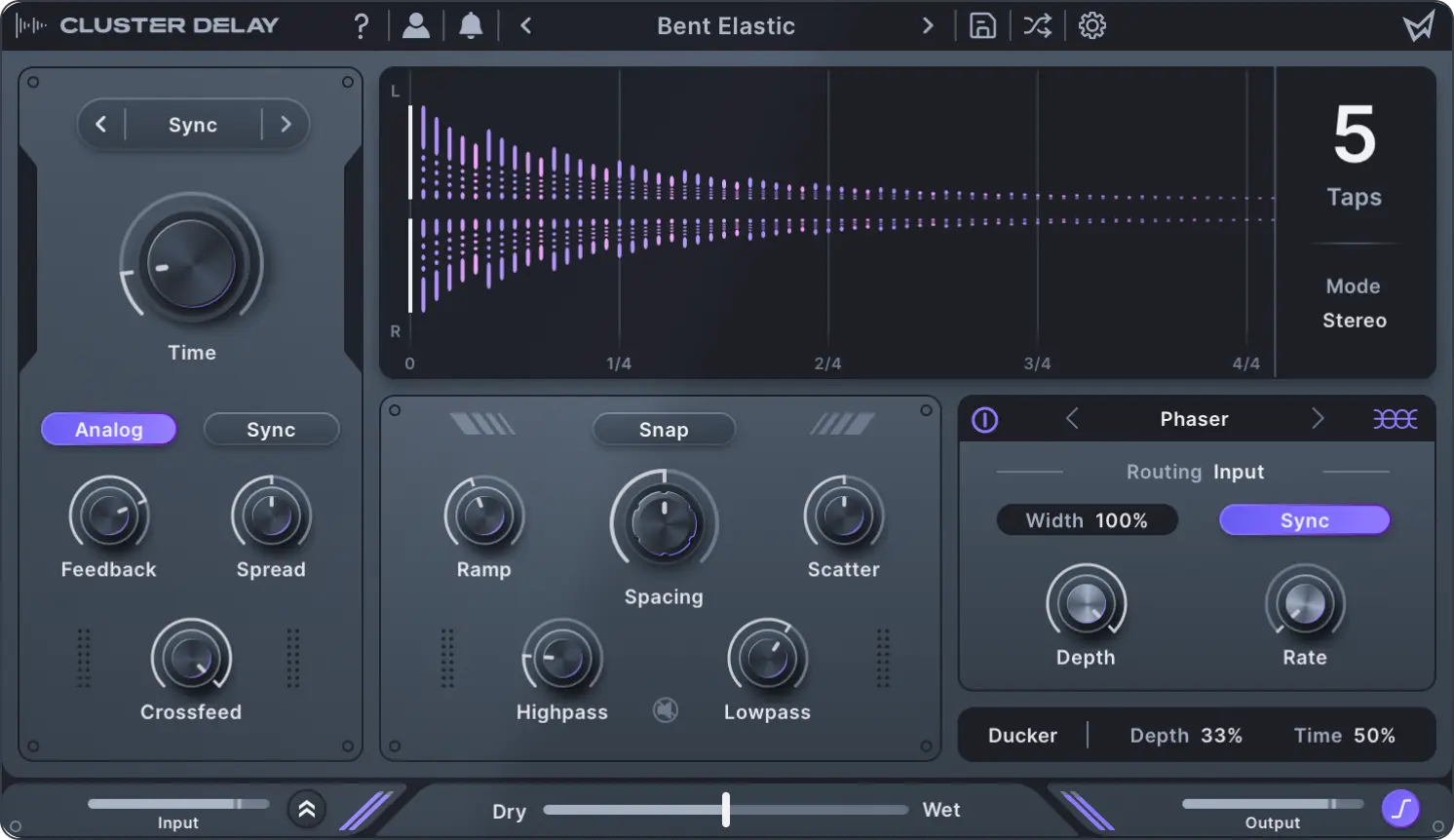
Cluster Delay's easy-to-use interface allows you to ramp, space, and scatter up to eight processed delay taps in time.
Lush spaces and echo soundscapes.
Explore ambience and transform any dry sound into expansive spaces. Use integrated diffusion and modulation to create reverb type effects.
Six integrated FX and more.
Create nuanced and unique sounding delays with six routable effects. Keep your mix clean with built-in ducking, filters, and mid-side control.
Diverse preset library.
Choose from 100 versatile presets ranging from retro tape delays to modern soundscapes.
Make it
yours
Tap Sequence Designer
- Cluster Delay
- Factory content
- 2 activations
- Free updates & support
 Subscribe-To-Own
- Cluster Delay + all software
- Factory content + all expansion packs
- 2 activations + monthly credit back*
- Free updates & support

*Store credit cannot be combined with other promotions.
Demos
Particle Grit
Hyperbuild
Moon Gazing
Main features
Multi-tap delay sequencer
Create patterns with up to 8 taps and quickly build unique rhythms with macro controls.
Visualize your delay
See exactly how your sound will evolve in time with our beautiful multi-tap display.
100 diverse presets
Immediately start creating with presets that make full use of Cluster Delay's features.
Six integrated effects
Transform your delay with wobble, diffusion, chorus, flanger, phaser, or frequency shifting.
Creative routing
Choose where each effect is placed in the delay line or use send mode for dub-style automation.
Vast stereo effects
Use features such as mid-side mode, cross-feedback, and diffusion to build evolving spaces.
Analog modeling mode
Activate analog modeled feedback to get rich delay effects inspired by vintage gear.
Automatic ducking
Keep your mixes clean and add energy by ducking the delay along to your dry input signal.
In-App Tooltips
Become an expert with built-in tooltips that make learning Cluster Delay a breeze.
Questions?
Answers.
Cluster Delay
What are the system requirements for Cluster Delay?
macOS 10.11 or later, including native Apple silicon, or Windows 10 or later. Requires a 64-bit DAW that supports AAX, AU, or VST3.
Is an internet connection required for use?
An internet connection is required for activation, but not for general use.
Where can I find the Cluster Delay manual?
Cluster Delay's online manual can be found here. You can also export it as a PDF for offline use. See the first page of the manual for details.
All Access
Will I lose my tracks if I cancel my All Access plan?
No, you will always be able to play back your sounds; we never disable our audio engines or produce any trial noise. Canceling your plan will only prevent you from using new instances of the plugin or making changes to existing settings. You can purchase any plugins perpetually if you would like to continue to use them after cancelling All Access.
How long does it take to own Cluster Delay via All Access?
It will take 4 months to receive enough ownership credit for a Cluster Delay perpetual license. Note that you can also mix your ownership credit with cash at any time.
How do I cancel my All Access plan?
You can cancel your plan at any time from your account page. There are no commitments or cancellation fees.